Zigbee Cluster Library for Node.js
This project implements the Zigbee Cluster Library (ZCL) based on the Zigbee Cluster Library Specification (documentation). It is designed to work with Homey's Zigbee stack and can be used in Homey Apps to implement drivers for Zigbee devices that work with Homey.
Note: if you are looking for the best way to implement Zigbee drivers for Homey take a look at node-homey-zigbeedriver.
The node-homey-zigbeedriver library implements this project and does a lot of the heavy lifting that is required for most Zigbee drivers for Homey. In the case you need to divert from node-homey-zigbeedriver it is possible to directly use the Zigbee Cluster Library for Node.js.
Make sure to take a look at the API documentation: https://athombv.github.io/node-zigbee-clusters.
Installation
$ npm install --save zigbee-clusters
Breaking changes
v3.0.0
- iasZone: Unified
zoneTypeenum keys between attribute andzoneEnrollRequestcommand to match ZCL spec (Table 8-5). See #176 for full impact analysis.cabonMonoxideSensor->carbonMonoxideSensor(typo fix)keyfob->keyFob(spec says "Key fob" - two words)standard->standardCIE(inzoneEnrollRequest)invalid->invalidZoneType(inzoneEnrollRequest)keyPad->keypad(inzoneEnrollRequest, spec says "Keypad" - one word)- Added missing
doorWindowHandle(0x0016) zone type from spec
v2.0.0
- Changed
Cluster.readAttributessignature, attributes must now be specified as an array of strings.
zclNode.endpoints[1].clusters.basic.readAttributes(['modelId', 'manufacturerName']);
Changelog
What changed in each version is listed in the GitHub releases. How those notes are put together is described under Releasing.
About Zigbee Clusters
A Zigbee cluster is an abstraction on top of the Zigbee protocol which allows implementing functionality for many types of devices. A list of all available clusters can be found in the Zigbee Cluster Library Specification section 2.2.. If you are familiar with Z-Wave Command Classes, Zigbee clusters are very similar.
Cluster hierarchy
It is important to understand the structure of a Zigbee node:
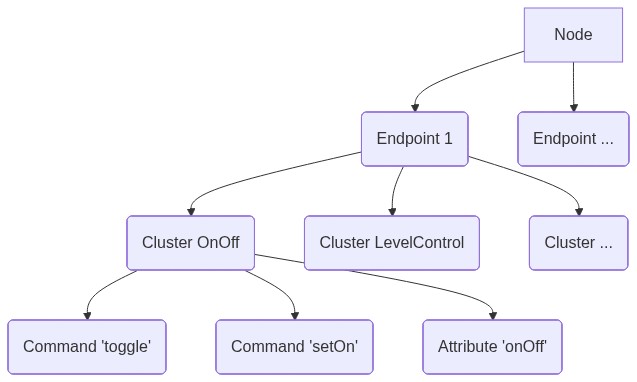
Client/Server clusters
A cluster can be implemented in two ways:
- As server
- As client
From the Zigbee Cluster Library Specification "Typically, the entity that stores the attributes of a cluster is referred to as the server of that cluster and an entity that affects or manipulates those attributes is referred to as the client of that cluster." More information on this can be found in the Zigbee Cluster Library Specification section 2.2.2..
Bindings and bound clusters
The concept of server/client is important for the following reason. Nodes can be receivers of commands (i.e. servers), or senders of commands (i.e. clients), and sometimes both. An example on how to send a command to a node can be found below. Receiving commands from a node requires a binding to be made from the controller to the cluster on the node, and the implementation of a BoundCluster (i.e. server cluster) to receive and handle the incoming commands. For an example on implementing a BoundCluster see below.
Usage
In order to communicate with a Zigbee node retrieve a node instance from ManagerZigBee and create a ZCLNode instance using that node. This step encapsulates the node with the Zigbee Clusters functionality and allows sending and receiving ZCL commands.
Basic communication with node
Sending a command
/drivers/my-driver/device.js
const Homey = require('homey');
const { ZCLNode, CLUSTER } = require('zigbee-clusters');

class MyDevice extends Homey.Device {
  onInit() {
    // Get ZigBeeNode instance from ManagerZigBee
    this.homey.zigbee.getNode(this).then(async (node) => {
      // Create ZCLNode instance
      const zclNode = new ZCLNode(node);

      // Send toggle command to onOff cluster on endpoint 1
      await zclNode.endpoints[1].clusters[CLUSTER.ON_OFF.NAME].toggle();

      // Send moveToLevel command to levelControl cluster on endpoint 1 and don't wait for
      // the default response confirmation.
      await zclNode.endpoints[1].clusters[CLUSTER.LEVEL_CONTROL.NAME].moveToLevel(
        {
          level: 100,
          transitionTime: 2000,
        },
        {
          // This is an optional flag that disables waiting for a default response from the
          // receiving node as a confirmation that the command is received and executed.
          // You should only use this flag if the device does not follow the
          // Zigbee specification and refuses to send a default response.
          waitForResponse: true,

          // This is an optional property that allows for adjusting the default response
          // timeout (10000ms) before the command is considered rejected.
          // The timeout starts after sending the frame and receiving a low-level ack.
          timeout: 5000,
        },
      );
    });
  }
}
Receiving an attribute report
/drivers/my-driver/device.js
const Homey = require('homey');
const { ZCLNode, CLUSTER } = require('zigbee-clusters');

class MyDevice extends Homey.Device {
  onInit() {
    // Get ZigBeeNode instance from ManagerZigBee
    this.homey.zigbee.getNode(this).then(async (node) => {
      // Create ZCLNode instance
      const zclNode = new ZCLNode(node);

      // Configure reporting
      await zclNode.endpoints[1].clusters[CLUSTER.COLOR_CONTROL.NAME].configureReporting({
        currentSaturation: {
          minInterval: 0,
          maxInterval: 300,
          minChange: 1,
        },
      });

      // And listen for incoming attribute reports by binding a listener on the cluster
      zclNode.endpoints[1].clusters[CLUSTER.COLOR_CONTROL.NAME].on(
        'attr.currentSaturation',
        (currentSaturation) => {
          // handle reported attribute value
        },
      );
    });
  }
}
Implementing a cluster
It is very easy to add support for a new cluster or add commands and/or attributes to an existing
cluster. All implemented clusters are listed in lib/clusters/index.js. It also exports a constant CLUSTER object for easy reference to a specific cluster name and/or id (e.g. CLUSTER.WINDOW_COVERING -> {NAME: "windowCovering", ID: 258}).
This example shows in a simplified way how the OnOff cluster is implemented (actual implementation). All the information with regard to the ids, names, available attributes and commands can be found in the Zigbee Cluster Library Specification section 3.8.:
zigbee-clusters/lib/clusters/onOff.js
// Define the cluster attributes
const ATTRIBUTES = {
  onOff: { id: 0, type: ZCLDataTypes.bool },
};

// Define the cluster commands (with potential required arguments)
const COMMANDS = {
  toggle: { id: 2 },
  onWithTimedOff: {
    id: 66,
    // Optional property that can be used to implement two commands with the same id but different directions. Both commands must have a direction property in that case. See lib/clusters/iasZone.js as example.
    // direction: Cluster.DIRECTION_SERVER_TO_CLIENT
    args: {
      onOffControl: ZCLDataTypes.uint8, // Use the `ZCLDataTypes` object to specify types
      onTime: ZCLDataTypes.uint16,
      offWaitTime: ZCLDataTypes.uint16,
    },
  },
};

// Implement the OnOff cluster by extending `Cluster`
class OnOffCluster extends Cluster {
  static get ID() {
    return 6; // The cluster id
  }

  static get NAME() {
    return 'onOff'; // The cluster name
  }

  static get ATTRIBUTES() {
    return ATTRIBUTES; // Returns the defined attributes
  }

  static get COMMANDS() {
    return COMMANDS; // Returns the defined commands
  }
}

// Add the cluster to the clusters that will be available on the `ZCLNode`
Cluster.addCluster(OnOffCluster);

module.exports = OnOffCluster;
After a cluster is implemented it can be used on a ZCLNode instance like this:
await zclNode.endpoints[1].clusters[CLUSTER.ON_OFF.NAME].toggle();
Note that CLUSTER.ON_OFF.NAME is just a string that refers to onOff in zigbee-clusters/lib/clusters/onOff.js
Implementing a bound cluster
Zigbee nodes can send commands to Homey via bound clusters. This requires a binding to be created on a specific endpoint and cluster. Next, a BoundCluster implementation must be registered with the ZCLNode which implements handlers for the incomming commands:
/lib/LevelControlBoundCluster.js
const { BoundCluster } = require('zigbee-clusters');

class LevelControlBoundCluster extends BoundCluster {
  constructor({ onMove }) {
    super();
    this._onMove = onMove;
  }

  // This function name is directly derived from the `move`
  // command in `zigbee-clusters/lib/clusters/levelControl.js`
  // the payload received is the payload specified in
  // `LevelControlCluster.COMMANDS.move.args`
  move(payload) {
    this._onMove(payload);
  }
}

module.exports = LevelControlBoundCluster;
/drivers/my-driver/device.js
const LevelControlBoundCluster = require('../../lib/LevelControlBoundCluster');

// Register the `BoundCluster` implementation with the `ZCLNode`
zclNode.endpoints[1].bind(
  CLUSTER.LEVEL_CONTROL.NAME,
  new LevelControlBoundCluster({
    onMove: (payload) => {
      // Do something with the received payload
    },
  }),
);
Implementing a custom cluster
There are cases where it is required to implement a custom cluster, for example to handle manufacturer specific cluster implementations. Often these manufacturer specific cluster implementations are extensions of existing clusters. An example is the IkeaSpecificSceneCluster (complete implementation):
lib/IkeaSpecificSceneCluster.js
const { ScenesCluster, ZCLDataTypes } = require('zigbee-clusters');

class IkeaSpecificSceneCluster extends ScenesCluster {
  // Here we override the `COMMANDS` getter from the `ScenesClusters` by
  // extending it with the custom command we'd like to implement `ikeaSceneMove`.
  static get COMMANDS() {
    return {
      ...super.COMMANDS,
      ikeaSceneMove: {
        id: 0x08,
        manufacturerId: 0x117c,
        args: {
          mode: ZCLDataTypes.enum8({
            up: 0,
            down: 1,
          }),
          transitionTime: ZCLDataTypes.uint16,
        },
      },
    };
  }

  // It is also possible to implement manufacturer specific attributes, but beware, do not mix
  // these with regular attributes in one command (e.g. `Cluster#readAttributes` should be
  // called with only manufacturer specific attributes or only with regular attributes).
  static get ATTRIBUTES() {
    return {
      manufAttribute: {
        id: 0,
        type: ZCLDataTypes.uint8,
        manufacturerId: 0x1234,
      },
    };
  }
}

module.exports = IkeaSpecificSceneCluster;
/drivers/my-driver/device.js
const IkeaSpecificSceneCluster = require('../../lib/IkeaSpecificSceneCluster');

// Important: we have created a new `Cluster` instance which needs to be added before
// it becomes available on any `ZCLNode` instance.
Cluster.addCluster(IkeaSpecificSceneCluster);

// Example invocation of custom cluster command
zclNode.endpoints[1].clusters['scenes'].ikeaSceneMove({ mode: 0, transitionTime: 10 });
This also works for BoundClusters, if a node sends commands to Homey using a custom cluster it is necessary to implement a custom BoundCluster and bind it to the ZCLNode instance. For an example check the implementation in the com.ikea.tradfri driver remote_control.
TypeScript Types
This project includes auto-generated TypeScript definitions (index.d.ts) for all clusters, attributes, and commands.
Manual Generation
To regenerate TypeScript types after modifying cluster definitions:
npm run generate-types
This runs scripts/generate-types.mts which loads all cluster modules and generates typed interfaces.
Automatic Generation (GitHub Actions)
TypeScript types are automatically regenerated when a push to any branch other than production changes:
lib/clusters/**/*.js- cluster definitionslib/Cluster.js,lib/constants.jsandindex.jsscripts/generate-types.mtsandscripts/template.d.ts.txt- the generator and its template
The workflow commits updated types back to that branch if changes are detected.
Contributing
Great if you'd like to contribute to this project, a few things to take note of before submitting a PR:
- This project enforces ESLint and Prettier: check with
npm run lintandnpm run format:check, and fix formatting withnpm run format:write. - Tests use the built-in node:test runner and one virtual device harness, see Writing tests.
- Adding or updating a cluster definition follows its own conventions, see Adding or updating a cluster definition.
- Pull request titles follow Conventional Commits, for example
fix(onOff): Handle a missing attribute. The title becomes a line in the release notes, so write it for someone using the library. See Release notes. - GitHub Action workflows run ESLint, Prettier and the tests, and publish releases.
Releasing
Releases are published from the production branch by the Deploy workflow (.github/workflows/deploy.yml).
- Open a pull request from
masterintoproductionwith#patch,#minoror#majorin its title, for exampleMerge master into production (#minor). - Merge it with a merge commit or a squash merge, not a rebase merge. The workflow reads the marker from the commit message that lands on
production, and only those two carry the pull request title into it.
The workflow then lints, checks formatting and runs the tests, builds, bumps the version and pushes the version commit and tag, publishes to npm with trusted publishing, and creates a GitHub release.
Instead of using a marker, you can also start the Deploy workflow by hand on production and pass the version bump as input.
If creating the GitHub release fails after the npm publish, create it by hand. Running the workflow again would bump the version a second time.
Release notes
GitHub generates the notes from the titles of the pull requests merged since the previous release, grouped by label. A workflow sets that label from the title's prefix, so a pull request lands in the right section on its own:
| Title prefix | Section |
|---|---|
feat |
New features |
fix, perf |
Fixes |
! before the colon, as in feat!: |
Breaking changes |
build, chore, ci, docs, refactor, style, test |
Left out |
| No prefix | Other changes |
The prefix itself is stripped from each line, and release pull requests into production are left out.
To move a pull request to another section, change its title, also after it was merged: the label follows. To reword a line, edit the release on GitHub after it is published.
The grouping is configured in .github/release.yml, the labeling in .github/workflows/label-pr.yml.